
TeacherOS
One-time purchase. Yours forever.
Direct, no marketplace fee. A matching mini-planner is offered at checkout. Also on Etsy.
- Single offline HTML file
- No subscription, no account
- Laptop, iPhone & Android
- Your data stays on your device
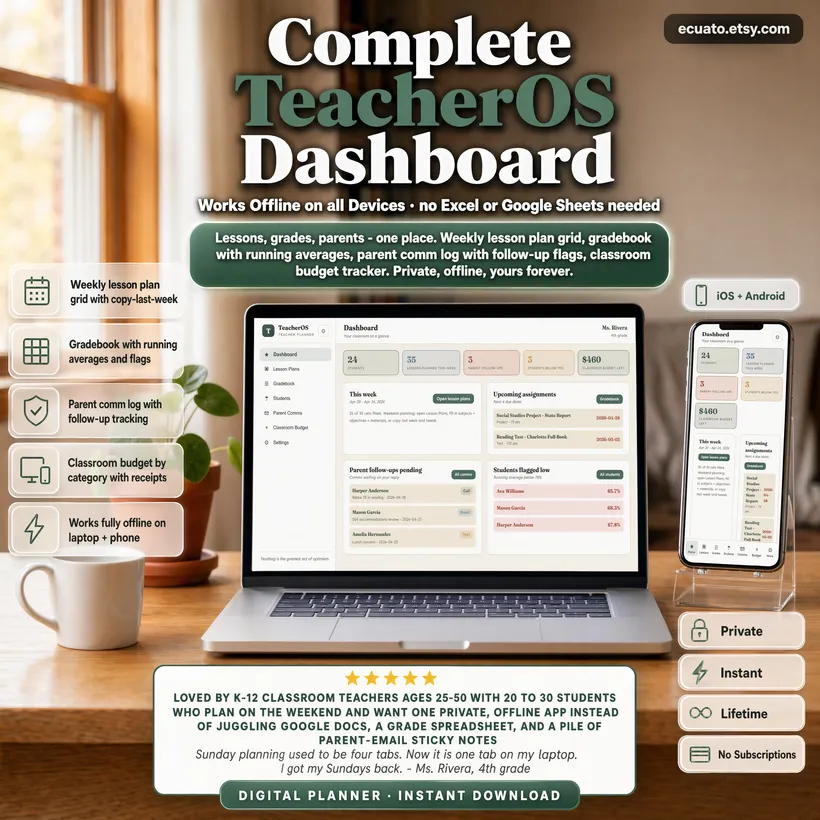
Your whole teacher week in one private app. TeacherOS is a weekend-planning tool built for real K-12 classrooms. A weekly grid lets you lay out 5 days x 7 periods with subject, objective, materials, and activity in each cell - then copy last week with one click and tweak.
The gradebook holds your full roster plus every assignment with type, points, and weight; a running weighted average is calculated per student and flagged red below 70. Each student has a full profile - IEP / 504 / ELL / GT flags, accommodations, behavior notes, and parent contact info.
Parent Comms logs every email, call, text, and in-person chat with a follow-up flag so nothing slips through, and your dashboard surfaces the pending ones every morning.
The classroom budget tab tracks your out-of-pocket spending by category (supplies, snacks, books, decor, tech) - because most teachers quietly spend $500-$1,500 of their own money per year. Runs entirely in your browser. No district login. No spreadsheet. No subscription.
WHAT'S INCLUDED
- Dashboard - this week's planned lessons, upcoming assignments due, parent follow-ups pending, students below 70, classroom budget left
- Lesson Plans - weekly grid 5 days x 7 periods. Subject, objective, materials, activity per cell. Copy last week. Clear week. Navigate prev/next week
- Gradebook - student roster x assignments table. Per-assignment: name, type (test / quiz / HW / project), points, weight, due date. Running weighted average per student. Color flag below 70%
- Students - per-student profile. Name, flags (IEP / 504 / ELL / GT), accommodations, behavior notes, parent name / email / phone. Search by name
- Parent Comms - log every email, call, text, in-person chat. Topic, notes, date, channel, follow-up flag. Pending follow-ups list on dashboard + own section
- Classroom Budget - annual budget vs spent, by-category breakdown (supplies, snacks, books, decor, tech). Full receipt log with store + description. DonorsChoose campaign notes
- Settings - profile (name, grade/subject, school), annual budget, export and import JSON, load demo data, clear all
100% PRIVATE AND OFFLINE
All data stays on your device. No server, no cloud, no account. Works completely offline.
WORKS ON ALL DEVICES
Open on laptop, add to home screen on iPhone (Safari) or Android (Chrome) as an app. One file, all devices.
INSTANT DOWNLOAD
Download once, use forever. No subscription, no renewal, no expiry.
PERFECT FOR
- K-12 classroom teachers planning lessons on the weekend
- Elementary teachers tracking 20-30 students across multiple subjects
- Middle and high school teachers juggling IEP/504 accommodations
- New teachers who want one organized place instead of five tabs
- Veteran teachers tired of Google Classroom + district gradebook quirks
Questions? Message us on Etsy - we reply within 24 hours.
Guides you might like
Best Teacher Planner Apps for the School Year
The best teacher planner apps depend on whether you need lesson plans, a gradebook, or an LMS. Compare TeacherOS, Planbook, Planboard, Additio, TeacherKit.
Best Homeschool Planners and Curriculum Tools
The best homeschool planner depends on whether you need curriculum or proof you taught it. Compare HomeschoolOS, Homeschool Planet, Time4Learning, Sonlight.
Back to school teacher setup: get organized before day one
A back to school setup checklist for teachers: build your schedule, load class lists, set up your gradebook, draft units, and start the term organized.
Classroom management systems that work
Classroom management systems that work: build routines and procedures, teach them early, track behavior patterns, and loop in parents with a contact log.